
DIY Nikon F100 Interface cable by Avi
Nikon F100
Interface cable build by Avi
DISCLAIMER – Important!
This connector is a custom one and I couldn’t find any second source for it.
Some newsgroups posts and sites suggested various ways of how to build your own plug
based on a PS2 plug or making a mold over pins for example. Seeing those fragile and insecure
solutions I thought this is too risky and decided to use an original Nikon plug.
I purchased a used MC-22 cable, split it and used the original Nikon 10 pin plug and cable.
(you can probably do the same with any other Nikon cable that has a 10 pin plug)
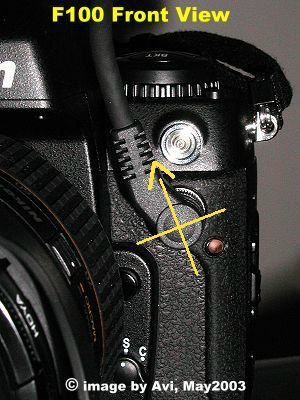
My guess is that Nikon placed the camera connector that way because the designers wanted to use an existing plug and this orientation was best from ergonomic point of view of the F100 and its flash socket. Well, we got a plug that fits several cameras, but we also got a strange orientation and not so convenient usability of it as well.

10 pin connector code
10 pin connector color code
 Tip : Your job will become easier if you’ll refer to the pins arrangement as to 4 slices of a circle ! Each slice has 2 pins in it and 2 pins are in the center.
Here are the mapping of pins and wires colors.
Both images are FRONT view and represent real orientation of connector and plug.

Interface cable view
Interface cable view
Avi’s Nikon F100 cables project posts:
My concept | DIY Interface cable | DIY DataCable-1 | DIY DataCable-2
DIY MC-30 | BUY DataCable2
Comments, remarks and updates are welcome.
Some will be published, with hidden sender's details.
Did you find this article helpful?
Did it save you time and trouble?
If yes, please consider donating some $$$ to help me cover the hosting cost involved. Thanks
To make a donation, please click the following PayPal button:

Copyright © Schneor Design. All rights reserved. Do not copy without written consent from the author.
0 Comments